


The House Now Has a Manual
Tuesday, 9:47 p.m., a hotel room in Munich
My phone rings. It’s my wife. “The heating is on, but the living room is freezing. What do I do?”
I’m 500 kilometres away, trying to operate an oil boiler over the phone. A boiler I only understand because I’ve been cursing at it every autumn for years. “Do you see the orange thing? No, the other orange thing. There’s a dial …” Anyone who has ever had a call like this knows how it ends: both sides are exhausted, and the living room is still cold.
That’s exactly why our house now has house documentation. A digital manual for our home that explains how the heating, the pumps, the water softener, the network and everything else work. And above all: what to do when they don’t. I built the whole thing with BookStack, a free wiki software I host myself at home. And the best part comes at the end: QR codes stuck right on the devices.
The knowledge lives in my head. And my head isn’t always at home.
In IT there’s a term called the bus factor: how many people have to be hit by a bus before a project grinds to a halt? In many households, that number is exactly 1. In ours, it certainly was.
This isn’t just a business-trip problem. You can get sick, end up in hospital, or something more serious can happen. Nobody likes to think about that. But that’s precisely when your family shouldn’t also be standing in front of a heating system only you know how to operate.
It gets especially critical when you run your home the way many of us tech enthusiasts do:
- Docker containers for home automation, DNS, media servers, and things whose names nobody but me can pronounce
- Custom hardware: sensors, actuators, controllers, a Raspberry Pi hidden somewhere behind a cupboard
- Custom code: automations, scripts, and rules that are “actually perfectly logical” if you’re the one who wrote them
- Networking: VLANs, static IPs, router configurations
For me, it’s a hobby. For my wife, it’s a black box that occasionally refuses to turn on the lights. If you build something like this, you’re responsible for the people who live with it. A smart home that only one person understands is, in an emergency, dumber than a perfectly ordinary one.
BookStack: a wiki that feels like a bookshelf
BookStack is open-source documentation software. You host it yourself, it costs nothing, and it runs in the browser, on a PC just as well as on a phone.
What sets BookStack apart from many other wikis is its sense of order. Instead of an endless tangle of pages, it uses a structure everyone understands instantly, because it comes straight from the real world:
- Shelves – the big topic areas, e.g. “Building Services”
- Books – one device or topic, e.g. “Oil Heating”
- Chapters – an optional way to split up a book
- Pages – the actual instructions, e.g. “How-To: Oil Delivery”
My wife didn’t have to learn a new system first. Shelf, book, page: you know that from the library, from your living room, and, if all else fails, from the IKEA catalogue.
What BookStack can do, and why it’s a great fit for house documentation
Free and self-hosted. BookStack is open source and runs as a Docker container on my home server. The data stays in the house: no subscription, no cloud service that changes its pricing one day.
An editor anyone can use. You write pages in a WYSIWYG editor, just like in Word. If you prefer typing Markdown, you can do that too. Images go in via copy-and-paste or drag-and-drop. That matters, because a photo of the right switch replaces three paragraphs of description.
A search that actually finds things. Full-text search covers every shelf, book and page. Type “salt” and you land on the water softener. Type “cold” and, hopefully, you land on the heating troubleshooting page.
Tags. Pages and books can be tagged, for example with “heating”, “pump” or “maintenance”. That way you can find related content across shelves.
Revision history. Every change is saved. If I “improve” a guide at one in the morning and realise the next day that it was better before, the old version is just one click away.
Users, roles and permissions. My wife has her own account. I decide who can read and edit what, right down to individual pages. Not everyone needs to be able to change the network configuration.
Diagrams. The built-in draw.io editor lets you draw network plans or pipe layouts right into a page. Admittedly, I haven’t tried that myself yet.
Export. Every page and every book can be exported as PDF, HTML, Markdown or plain text. My tip: also print out the most important emergency guides and keep them next to the device. Because house documentation running on a server isn’t much help when the power is out.
Works on your phone. The interface adapts to small screens. Nobody takes a laptop down to the boiler room.
What our house documentation looks like
Our house documentation has three shelves:
- Building Services – heating, pumps, controllers, actuators, home automation, alarm system
- IT – internet connection, cabling, network services, configurations, troubleshooting
- Maintenance – things that need doing regularly throughout the year
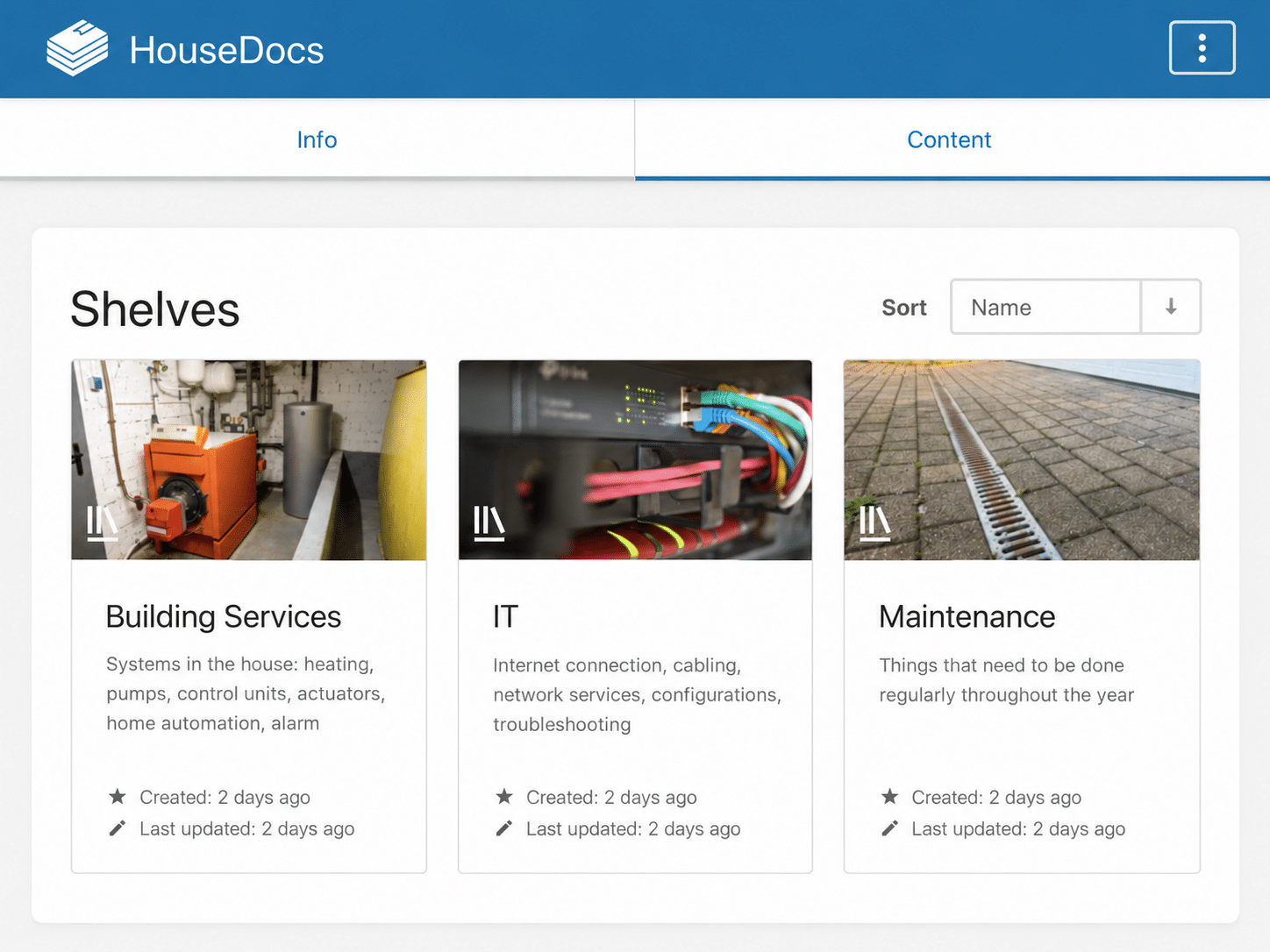
Every shelf gets a real photo. Sounds like a gimmick, but it helps enormously: one look at the orange boiler and you know you’re on the right shelf.
On the Building Services shelf, every device has its own book: the rainwater pump, the water softener and, of course, the oil heating.
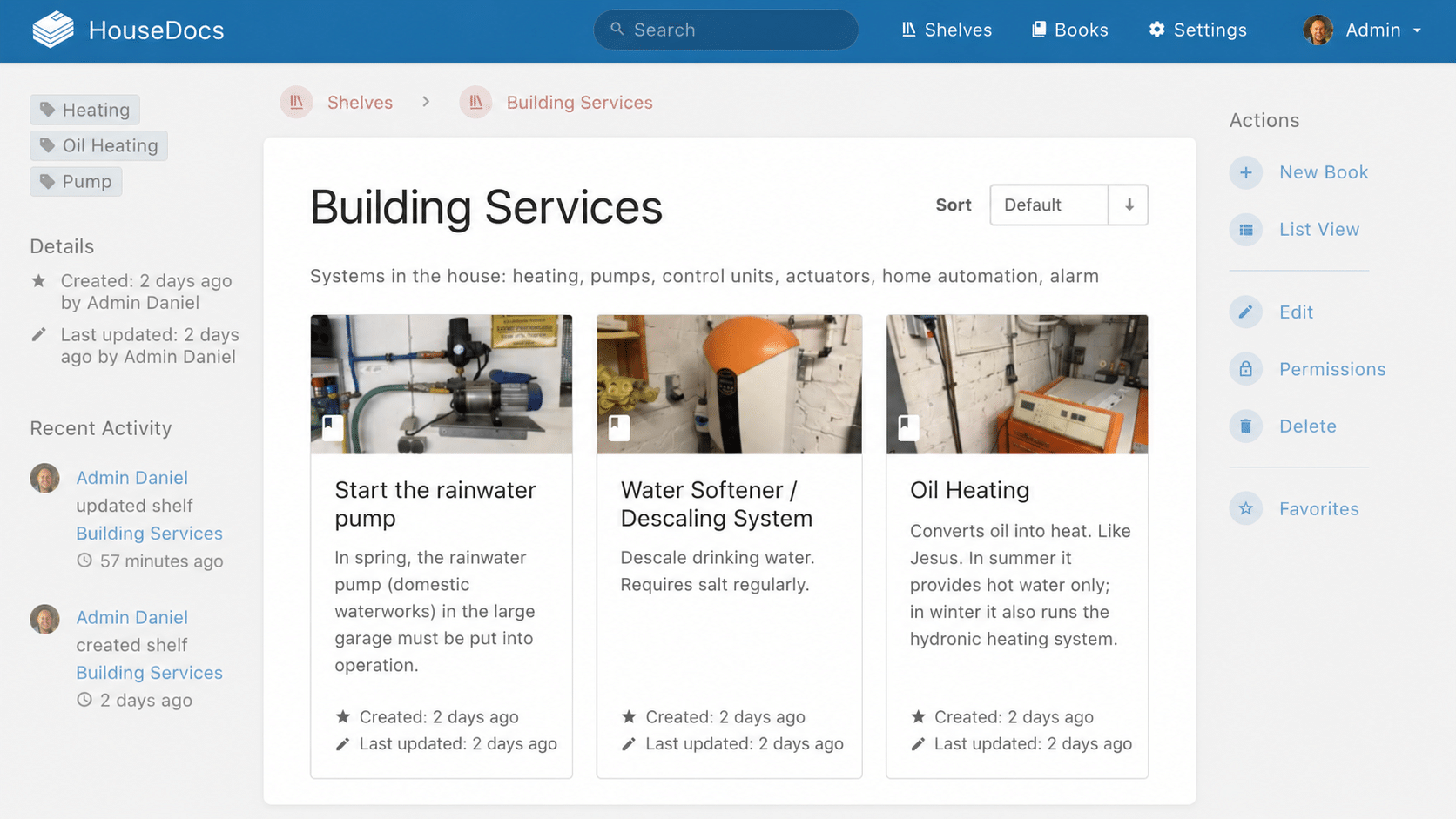
The descriptions are allowed to sound human. The water softener “descales drinking water and needs salt regularly”. That’s all you need to know at first. And the oil heating? “Converts oil into heat. Like Jesus.” Theologically daring, but you’ll remember it.
The Oil Heating book then holds the actual guides:
- How-To: Oil delivery (spoiler: switch the heating off completely before the tank is filled)
- How-To: WINTER – switching the heating to heating mode
- How-To: SUMMER – switching the heating to hot water only
- How-To: Checking that the heating works (flow and return temperatures)
- Troubleshooting: No or wrong room temperature even though the heating is running
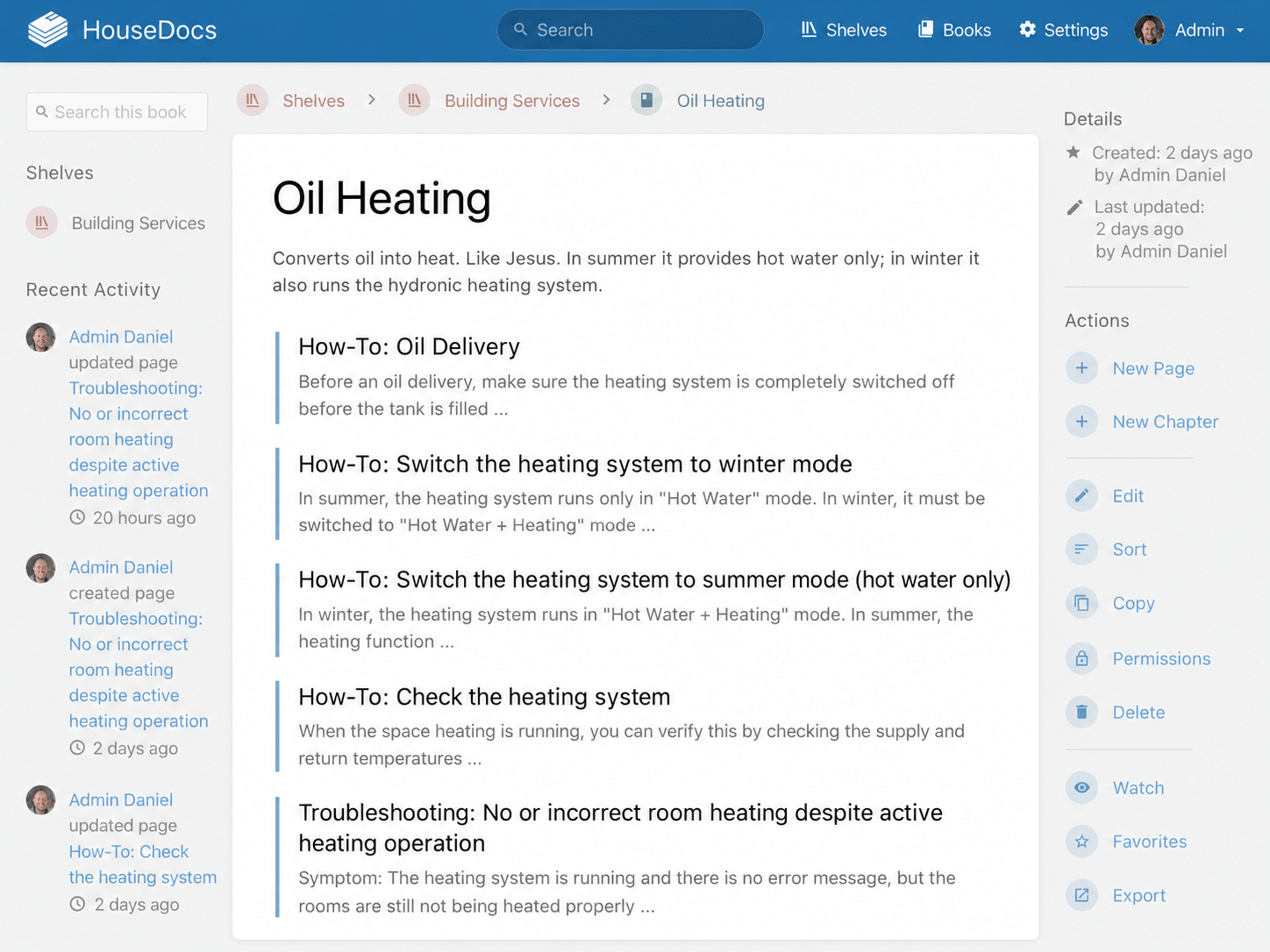
The pages follow a simple pattern: How-To for things you do on a schedule. Troubleshooting for things that are broken right now. Troubleshooting pages always start with the symptom, meaning what you see or feel: “The heating is running, there’s no error message, but the rooms are still cold.” That’s exactly how my wife would describe the problem on the phone. So that’s exactly how it’s written in the docs.
Also worth having: “Where is…” pages. They answer time-critical questions in the very first line, with a photo. For example, “Where is the main water shut-off valve?” when a pipe has just burst somewhere.
The clever bit: QR codes right on the device
The best documentation is useless if you have to go looking for it. When you’re standing in front of a system in the basement, you don’t want to click through shelves. That’s why every documented device has a QR code stuck on it.
An example: in spring, my wife is standing in front of the rainwater pump in the big garage. She pulls out her phone, scans the code and lands straight on the page “Starting up the rainwater pump”. No searching, no phone call, no “Which pump do you mean?”.
Here’s how it works:
- Every page and every book in BookStack has a fixed, human-readable URL.
- I turn that URL into a QR code, using any QR code generator.
- The code is printed out, ideally laminated or on a weatherproof label, and stuck somewhere clearly visible on the device.
- Next to it, a short note says where it leads, e.g. “Guide: rainwater pump”.
A tip: link to the book rather than a single page. That way you land on all the guides for that device, and the code keeps working even if you rename pages or add new ones.
Important: our BookStack only runs on the home network. So the phone has to be on the Wi-Fi for the code to work. If your basement has no signal, check your Wi-Fi coverage before you start cursing the technology. And if you want access from outside, set it up properly through a VPN instead of simply opening a port.
Eight tips for house documentation people will actually use
- Write for the person who’s going to read it. Not for yourself. “Check the flow temperature” is clear to me. For my wife, “The left thermometer on the boiler should show more than 50 degrees” is clearer.
- Photos, photos, photos. Every switch, every valve, every display. A red arrow in a picture is worth more than the finest wording.
- Think from the symptom. Nobody searches for “mixing valve position, heating circuit 1”. People search for “living room cold”.
- Clear page types. How-To for planned tasks, Troubleshooting for faults. That makes the documentation predictable.
- Document your contacts. Heating engineer, electrician, oil supplier, internet provider, with phone numbers and customer numbers. Sometimes the best instruction is: “Call this number.”
- Document the tinkering too. Which container does what? Where does it run? How do you restart it? And what happens if you just leave it alone? The honest answer, “Then the lights still work, just not automatically”, is incredibly reassuring.
- Test with your audience. Have the guides read by the people they’re meant for. Every spot where they ask a question needs rewriting. No review is more honest.
- Docs for the mastermind, too. A central knowledge base doesn’t hurt for my own topics either: VLANs, routing, IP addresses, subnets, VPN configs. Better organised in BookStack than in 14 different Word and Excel files.
Conclusion: the best smart home project is the one that works without me
The house documentation wasn’t a weekend project you finish once. It grows with every device, every fault, and every “Oh, I really should have written that down”. But the effort is manageable, and BookStack makes it genuinely easy: one container, an intuitive structure, an editor with no learning curve.
The real payoff isn’t technical. It’s the good feeling on a business trip that nobody at home is standing helplessly in front of a cold radiator. And the even better feeling that my family will manage even if, one day, I can’t be reached at all.
If you run Docker containers, home-built hardware and self-written automations at home, I urge you: document it. Not for yourself, but for the people you live with. Your house may be smart. But only with good documentation is it family-proof.
And if the phone does ring after all: “Just scan the QR code on the boiler.” The best sentence I’ve ever said on a business trip.